


JF RETAIL
JF Retail runs the point of sale, from a single store to an international chain, and is part of the ERP. It is universal: it works on any device, with no dedicated hardware. Barcode sales, exchanges and returns, receipts fiscalised via the web on the RT fiscal printer or in the cloud with each country's tax authority, and one stock shared with the warehouse and e-commerce.
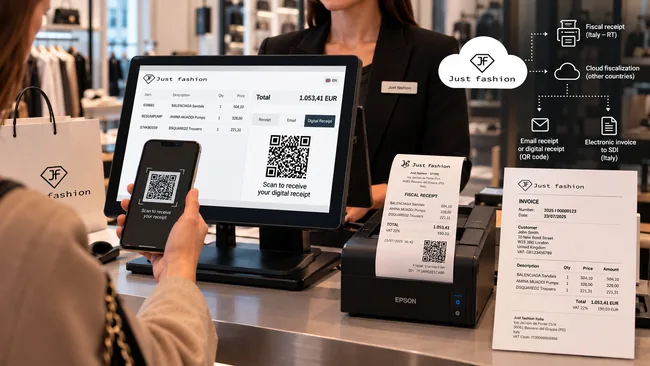
The store that speaks directly with the ERP
A single shop, an outlet, a chain of owned or franchised stores, monobrand or multibrand: JF Retail runs the point of sale natively within Just Fashion, with no synchronisation programs, no import/export and no delays between store and headquarters.
Works on any device, with no dedicated hardware
JF Retail is web-based: it works on PC, Mac, iPad, Android tablets and smartphones. It does not require proprietary tills or expensive hardware: all it takes is the device you already have, a barcode scanner and an ordinary receipt printer.
The interface is touch-friendly and fast, designed to scan items, apply discounts, choose the payment method and issue the receipt in seconds.
For every kind of point of sale
From a single boutique to an international network: monobrand stores, multibrand stores with purchase orders to brands, outlets, franchises and pop-up stores.
Each store can belong to a different company, sell in its own currency and in its own language, with its own price lists and its own promotions, while headquarters reads the consolidated results in real time.
Two ways to fiscalise, for every country in Europe
Every country has its own fiscal rules: RT fiscal printers in Italy, certification modules in Germany and Austria, cloud fiscalisation in Spain and Portugal, plain receipts in Switzerland. JF Retail covers both models from a single system.
Fiscalisation via the web on the RT fiscal printer
In Italian stores the web till drives the RT fiscal printer directly via the web, with no drivers to install on the PC or tablet: the till sends the sale to the RT, which issues the fiscal receipt and transmits the day's takings to the Revenue Agency.
If the customer asks for an invoice, it is issued from the same sale and sent to the SDI via the ERP's electronic invoicing module, without re-entering the data.
How it works
Cloud fiscalisation, with no fiscal printer
In countries where fiscalisation is required, JF Retail connects via cloud API directly to the service certified with each country's tax authority: Germany (KassenSichV with cloud TSE), Austria (RKSV), Spain (TicketBAI in the Basque Country and the national Verifactu), France (NF525 certification), Portugal and Sweden.
Each sale receives a unique transaction ID and, where required, the fiscal QR code printed on the receipt or sent digitally: validity can be checked directly by the tax authority. The store does not need an RT or TSE module: an ordinary receipt printer or a screen is enough.
How it works
What is fiscalised
Countries covered by cloud fiscalisation
Where no fiscalisation is required
In countries such as Switzerland the store works in exactly the same way, simply without the fiscalisation step.
No specific hardware
The till works on any device. With the RT, the web till drives it directly. In the cloud, no RT or TSE module: all it takes is the device you prefer, a barcode scanner and an ordinary receipt printer.
Each country's rules, one system
Receipts and invoices meet the requirements of the country where the store is located, with no local fiscal program for each market.
A new country is not a new project
Opening stores in another country means activating its fiscalisation, not changing tills, suppliers or procedures.
Several countries, several companies, one store network
When stores open abroad, they often belong to a local company. Just Fashion manages the whole network from one system, while keeping each company's accounts and each country's rules separate.
Multi-company (intercompany)
Stores belonging to different companies, for example an Italian, a German and a Swiss one, share the same products and the same processes. The intercompany module keeps stock, transfers and reporting consistent across companies, with the right documents when goods move from one company to another.
Multi-currency and multi-language
Each store sells in its own currency and its own language, with its own price lists, while headquarters reads the results of the whole network together.
Fiscal rules by country
Every store is fiscalised according to the country where it is located: cloud fiscalisation where it is required, a plain receipt where it isn't.
One view from headquarters
Sales, stock and margins of every store, in every country, in real time: by store, by country, by company and by collection.
From the till to headquarters, with no files in between
Every step works on the same data. The store sells, headquarters sees it immediately.
-
Products and prices from the ERP
Styles, colours, sizes, barcodes and store price lists come from the product master data: nobody re-creates items at the till.
-
Sale with barcode scanning
The associate scans the items, applies any discount and chooses the payment method.
-
Fiscalisation in real time
The receipt is fiscalised via the web on the store's RT fiscal printer, or in the cloud, with no fiscal printer, directly with the country's tax authority.
-
Paper or digital receipt
The customer receives the receipt on paper, by email, or by scanning with their phone the QR code shown at the till. If they ask for an invoice, it is issued from the same sale.
-
Stock updated on every channel
The item leaves the store's stock and availability is updated for the warehouse, the other stores and e-commerce.
-
Replenishment and transfers
Headquarters sees what each store has sold and restocks it; transfers between stores travel as orders, with the right documents.
-
Daily closing and analysis
At the end of the day the till is closed and the day's figures are already at headquarters, by store, collection and margin.
The item sold in the store is gone from the website too.
Stores, warehouse and e-commerce read the same stock. No overnight alignment, and no selling online an item that has just left the shop.
The store, from the counter to the till closing
All modules work on the same products, the same stock and the same customers as the rest of the ERP.
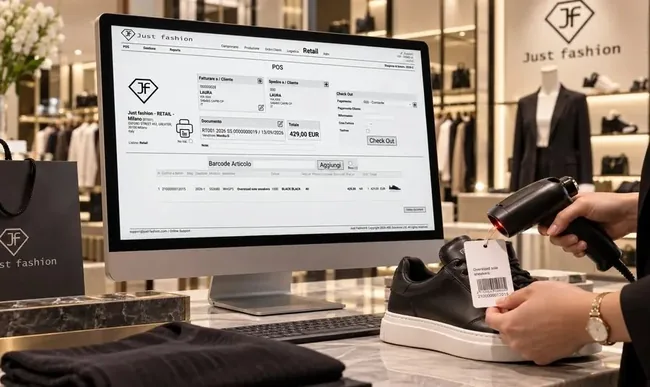
1. Sales, exchanges and returns
A touch interface designed for the counter: the associate scans the barcode, the item appears with style, colour, size and store price, and the sale is closed with one or more payment methods.
A size or colour exchange is done in the same screen, starting from the original receipt. A return can be refunded or turned into store credit for a future purchase, and gift vouchers are issued and redeemed at the till.
- Works on any device: PC, Mac, tablet and smartphone
- Touch interface, no dedicated hardware
- Barcode scanning by style, colour and size
- Size and colour exchanges from the original receipt
- Returns with refund or store credit
- Gift vouchers
- Discounts at the till
2. Fiscal receipts and invoices on request
Every sale is fiscalised in real time. In Italian stores the web till sends it to the RT fiscal printer, which prints the receipt and transmits the takings to the Revenue Agency. Alternatively, with no fiscal printer, the sale is fiscalised in the cloud, directly with the tax authority of the store's country, and the fiscal data returned is saved with the sale and shown on the receipt or commercial document. Fiscal data is archived in compliance for 10 years, and the rules are updated when legislation changes, with no action needed in store.
The receipt can be printed, emailed or become a digital receipt: with cloud fiscalisation, a QR code appears at the till and the customer scans it with their phone to receive the receipt, without leaving an email address or any other personal data. In countries that require it, such as Germany, Spain and Portugal, the receipt also carries the fiscal QR code with the signed transaction data, which makes it possible to check its validity. When the customer asks for an invoice, it is issued from the same sale with their details and, in Italy, sent to the SDI like every other invoice in the ERP, in a numbering sequence dedicated to stores if you wish.
- Fiscalisation via the web on the RT fiscal printer in Italy
- Cloud fiscalisation, with no fiscal printer
- Compliant archiving of fiscal data for 10 years
- Printed, email or digital receipt with QR code
- Fiscal QR code on the receipt where required
- Invoice on request from the same sale
- SDI e-invoice for Italian stores
- Numbering sequence dedicated to stores
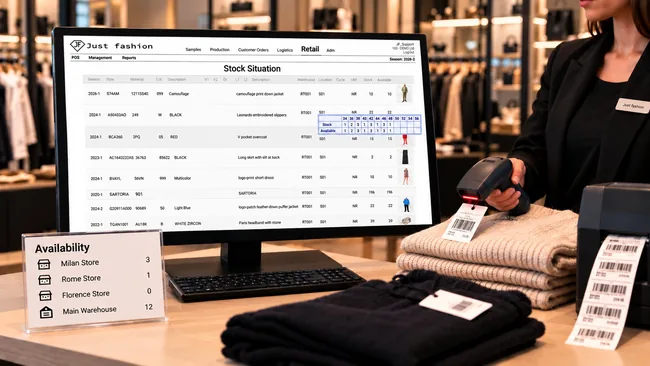
3. Store stock, replenishment and transfers
Each store has its own stock, read with the size grid by style and colour, and can see availability in the other stores and in the warehouse: if a size is missing, the associate knows at once where to find it.
Headquarters replenishes stores based on what they have sold, and transfers between stores travel as orders, with their own reason code: they are allocated, picked and shipped like any other shipment, with a delivery note or, abroad, a valued pro-forma invoice. Goods received are checked with the barcode scanner, and store stock counts are done with the same tool.
- Store stock by size grid
- Availability in other stores and in the warehouse
- Replenishment from headquarters
- Transfers between stores handled as orders
- Goods receipt checked by barcode
- Store stock counts
- SKU barcode label printing
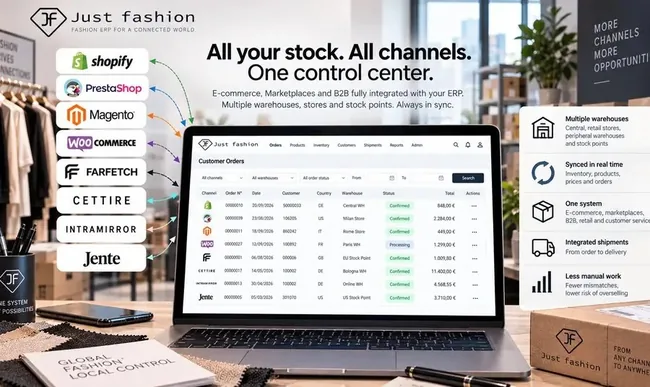
4. Stores and e-commerce together
Because there is only one stock, the store also works for online sales. The availability published on e-commerce includes the stores, an online order can be shipped from the store that has the item, with the courier label and tracking generated in the ERP, and the customer can collect in store what they bought online.
Brands that sell in store with the Shopify till can keep using it: sales made in Shopify flow into Just Fashion, where they update stock and, if the customer asks, become an invoice sent to SDI. See the Shopify integration.
- Real-time stock sync with e-commerce
- Ship-from-store with label and tracking
- Click & collect
- Shopify till sales synchronised with the ERP
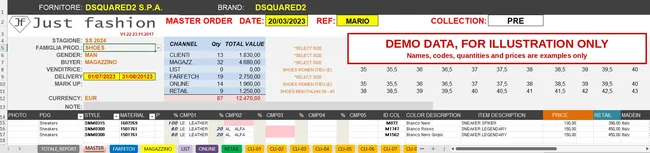
5. Multibrand stores: from the showroom template to the supplier order
A multibrand store buys the collections of many different brands. The buyer often fills in the Just Fashion Excel template directly in the showroom, at the brand, while choosing the pieces: this way the purchase value and the retail value of the order are under control while buying.
All the information is imported from the template: product master data, compositions, made in, customs codes, purchase prices and retail prices. The quantities purchased by channel can also be entered, for example warehouse, stores, e-commerce, marketplaces and customers. No item has to be re-created by hand, one by one.
Once the template is imported, JF Retail creates the supplier order, which then moves forward: for each order you see what has been ordered, what has already arrived and what is still to be delivered, by style, colour and size. Goods received are checked by barcode, go into stock and are immediately on sale in store and online.
From the showroom to the store
- Excel template filled in at the showroom, directly at the brand
- Purchase value and retail value under control while buying
- Import of product master data, compositions, made in and customs codes
- Purchase prices and retail prices
- Quantities purchased by channel
- Supplier order created from the template import
- Progress: ordered, arrived, to be delivered
- Goods receipt by barcode and stock loading
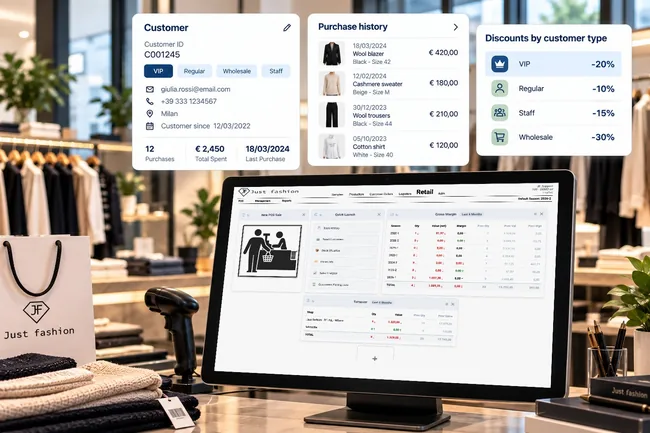
6. Customers and discounts by customer type
The store customer is registered once and recognised in every store, with their purchase history. Discounts are defined at headquarters by customer type and applied automatically at the till, without the associate having to calculate them.
- Customer master data shared by all stores
- Customer profiles
- Purchase history by customer
- Discounts by customer type, applied at the till
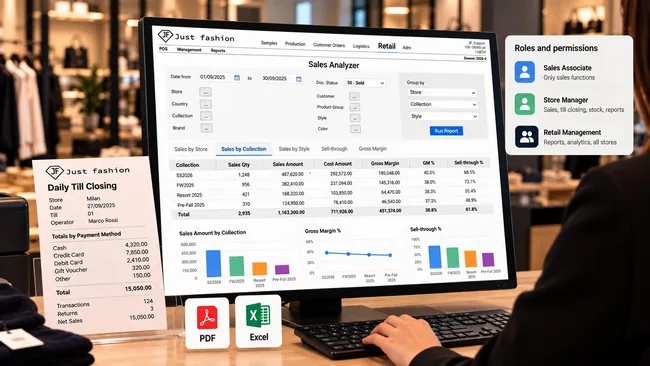
7. Till closing, roles and analytics
At the end of the day the till closing summarises takings by payment method, and the day's figures are already at headquarters. Access is organised by role: associates, store managers and retail management each see what they need, and nothing more.
Sales analysis shows sales and gross margin by store, country, collection and style, with export to PDF and Excel, so you can decide what to restock, what to move between stores and what to mark down.
And not only in JF Retail: all retail data flows into the sales tray of Just Fashion Business Intelligence, together with B2B wholesale sales and B2C e-commerce sales. Stores, wholesale customers and websites are read in a single analysis, by channel, season, collection and style, with no extractions and no spreadsheets to reconcile.
- Daily till closing by payment method
- Roles and permissions for associates, store managers and management
- Sales analysis by store, country, collection and style
- Gross margin by store and collection
- Visual reports with PDF and Excel export
- Retail data in Business Intelligence together with B2B and B2C e-commerce
From the first store to the twentieth, in more than one country
A retail project is not just a matter of licences. Before the first store opens, sales flows, fiscal requirements, transfers between companies and store roles must be decided, and they have to work the same way in every country.
Just Fashion follows the project from the start: we design the start-up method and the sales flows for each country once, then start up and train each store, on site or remotely. A store's licence starts when that store goes live, so the cost grows with the network, not ahead of it.
How a roll-out works
The plan is agreed with each customer, based on the countries and the opening calendar.
Flows and method
Sales flows, fiscal rules, intercompany transfers and roles, defined once for all countries.
Fiscal set-up by country
RT fiscal printer or cloud fiscalisation, depending on the country and the customer's choices.
Store start-up and training
Each store is configured and its staff trained, on site or remotely.
Go-live store by store
Stores open according to the calendar, and each licence starts from its go-live.
The brands that sell with JF Retail
Fashion houses, brands and groups that run their points of sale with JF Retail, integrated with the rest of Just Fashion.

Modes

Mario Valentino

One Block Down

Retori

Byblos

Alysi

Rame

Larusmiani

Bax Group
The store at the end of the chain, and the data at the start.
The store sells products created in the collection, received in the warehouse and priced at headquarters. What it sells comes back as data for replenishment, markdowns and next season's buying.
That is why JF Retail is not a separate program to be reconciled: it is part of the same ERP.
Related modules
- ✓Product Data & Costs, styles, barcodes and store price lists
- ✓Warehouse & Logistics, stock, replenishment and transfers
- ✓Shipping, Invoicing & Returns, e-invoicing and European fiscal compliance
- ✓Customer Orders & Agents, transfers between stores as orders
- ✓Shopify integration, e-commerce and Shopify till
Key features
Available functions, organised by area.
- ✓Universal: works on any device, with no specific hardware
- ✓Barcode sales by style, colour and size
- ✓Size and colour exchanges, returns and refunds
- ✓Store credit and gift vouchers
- ✓Fiscalisation via the web on the RT fiscal printer in Italy
- ✓Cloud fiscalisation, with no fiscal printer
- ✓KassenSichV, RKSV, TicketBAI, Verifactu, NF525 and SAF-T compliance
- ✓Receipts and invoices fiscalised with each country's tax authority
- ✓Printed, email or digital receipt with QR code
- ✓Fiscal QR code on the receipt where required
- ✓Invoice on request, SDI e-invoice for Italian stores
- ✓One stock shared by stores, warehouse and e-commerce
- ✓Availability in other stores and in the warehouse
- ✓Replenishment and transfers between stores
- ✓Store stock counts and SKU label printing
- ✓Ship-from-store and click & collect
- ✓Multibrand: Excel template with master data, compositions, made in, customs codes, prices and quantities by channel
- ✓Supplier order created from the template, with ordered, arrived and to-be-delivered progress
- ✓Multi-company intercompany module
- ✓Multi-currency and multi-language
- ✓Shopify till sales synchronised with the ERP
- ✓Customer profiles
- ✓Discounts by customer type
- ✓Roles and permissions by user
- ✓Daily till closing
- ✓Sales analysis and gross margin by store and collection
- ✓Retail sales in the BI sales tray, together with B2B and B2C e-commerce
- ✓Sales reports with PDF and Excel export
From barcode scan to fiscalised receipt, in any country.
We'll show you a sale at the till, fiscalised in real time and emailed to the customer, stock updated on e-commerce, and the day's figures at headquarters.