


JUST FASHION & JOOR
Native connector with JOOR, the wholesale platform for fashion: linesheets created from the ERP with photos, swatches, barcodes, descriptions and price lists, availability updated with every warehouse movement, and buyer orders that reach Just Fashion ready to be confirmed, picked, shipped and invoiced.
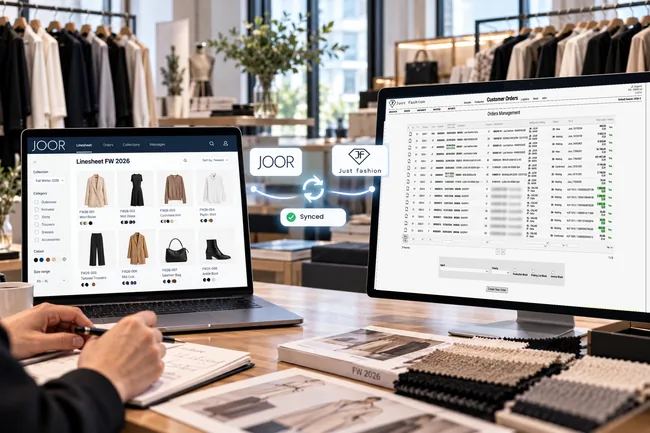
The showroom is on JOOR. Catalogue, stock and orders stay in the ERP.
JOOR is the B2B wholesale platform for fashion and luxury: brands present their collections to buyers through virtual showrooms and digital linesheets, and collect orders online.
For the brand, the risk is having two systems to keep aligned: the catalogue to reload on JOOR every season, prices and availability to update by hand, orders to re-key into the ERP. The Just Fashion connector, which can also connect multiple JOOR portals for groups with several brands, removes this work: linesheets are created from the product master data in the ERP, availability is updated with every warehouse movement, and buyer orders reach the Just Fashion OMS (Orders Management) and follow the same path as every other order: confirmation, allocation, picking, shipping and invoicing.
Just Fashion has been a JOOR Gold Partner since 2018: the integration is developed and maintained in house, together with the rest of the ERP.
No double data entry, from the collection to the buyer.
Data is created once in Just Fashion and reused on JOOR: products, photos, prices, availability. And what the buyer orders on JOOR comes back into the ERP without being re-keyed.
Linesheets always aligned
Styles, colours, sizes, photos, compositions and prices reach JOOR from the ERP master data. If a colour is dropped from the collection, it is disabled and disappears from the linesheet too.
Real availability
Every warehouse movement and every allocation updates availability on JOOR, across multiple warehouses too: buyers order what is really there.
Orders already in the OMS
Orders approved on JOOR enter Just Fashion Orders Management only for verified customers, with agent, lines and sizes, and from there go through production, allocation, shipping and invoicing like any other order.
The three flows of the integration
The integration works via API on three flows: cross-reference tables that link the codes of the two systems and the customers shared at go-live, the publishing of products and availability, and the import of orders.
One language between Just Fashion and JOOR
Each system has its own codes. Cross-reference tables link the values of Just Fashion to those of JOOR once and for all: items and SKUs, sizes, compositions, product categories, brands, gender, made in, images, B2B customers, payment terms and Sales Representatives, who correspond to agents in Just Fashion.
They are set up at go-live and updated only when a new value appears, for example a new size range. From then on, data moves from one system to the other with no manual translation.
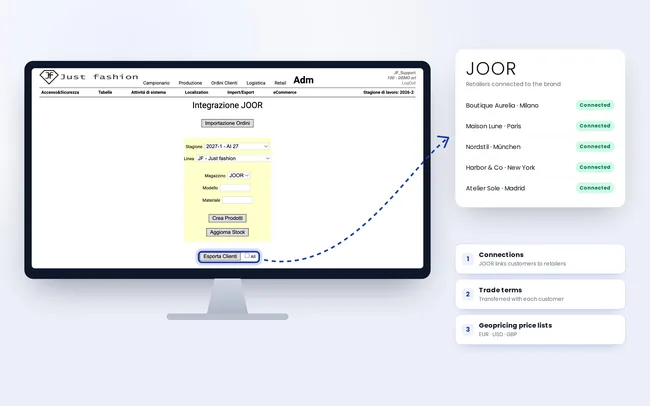
At go-live: the customers you already have go to JOOR
When you start with JOOR, your customers are often all in Just Fashion already. There is no need to load them again by hand: they are shared and sent to JOOR, which links them to the retailers on the platform and creates the connections with the brand.
Together with the customers come their trade terms, including the ERP payment terms mapped on JOOR, and therefore all the geopricing sales price lists: different markets and currencies, wholesale and retail prices. From day one, every buyer sees the collection on JOOR with the right prices and terms.
The same goes for retailers who come later: a new B2B customer is created in Just Fashion and mapped on JOOR, because their tax data must be checked in the ERP before they receive orders and documents.
- Existing customers shared and sent to JOOR
- JOOR links them to retailers and creates the connections
- Trade terms transferred with the customer
- ERP payment terms mapped on JOOR
- Geopricing price lists by market and currency
- Wholesale and retail prices
- New B2B customers created and mapped in Just Fashion
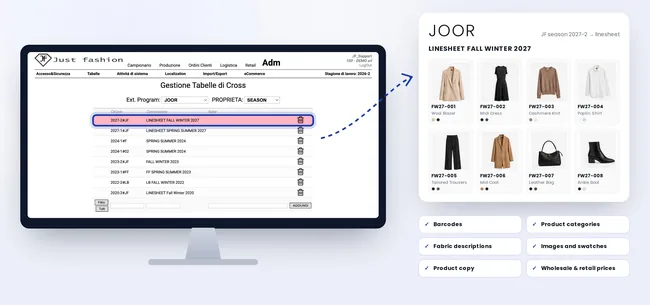
Linesheets created from the ERP
Just Fashion creates the products and linesheets on JOOR with all their attributes: style, colours, sizes, barcodes, compositions, fabric descriptions, made in and categories. The images and swatches of each colour are transferred too and, if available, the product copy already written in the ERP. And of course the wholesale and retail price lists in geopricing, with different markets and currencies.
Images are there even when the photo shoot is not ready yet: with JF AI, the artificial intelligence of Just Fashion, product images and multilingual copy are generated directly on the item master data and reach the JOOR linesheet through the same synchronisation, with no extra steps.
The synchronisation also decides what is visible: items and colours are enabled or disabled from the ERP, so the linesheet follows the collection with no manual work on JOOR.
- Automatic creation of products and linesheets
- Attributes, categories and barcodes
- Fabric descriptions and compositions
- Images and swatches by colour
- Product copy, if available
- Images and multilingual copy generated with JF AI
- Wholesale and retail geopricing price lists, by market and currency
- Items and colours enabled or disabled from the ERP
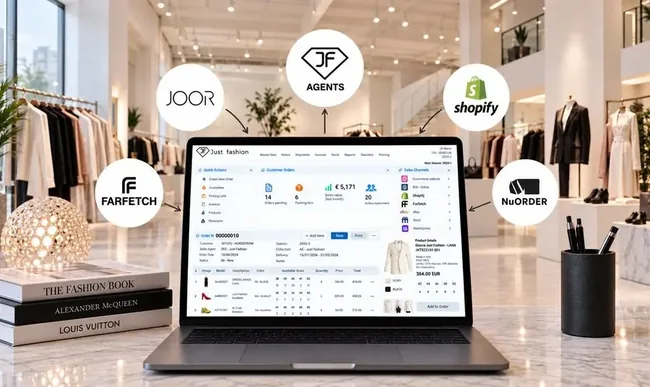
Availability updated with every movement
For stock orders, the linesheet orders with immediate delivery, availability on JOOR is updated online: every warehouse movement and every allocation in Just Fashion changes the published availability, by size.
It also works with multiple warehouses and locations, and takes into account what is sold on the other channels: an item sold in a store or on the e-commerce site does not stay orderable on JOOR.
- Online availability for stock orders
- Updated with every movement and allocation
- Multiple warehouses and locations
- One stock for all channels
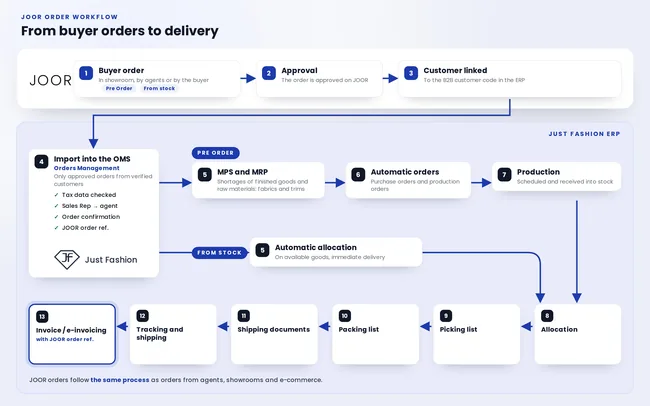
From buyer orders to delivery
Orders collected on JOOR, in the showroom or directly from buyers, are imported into Just Fashion once approved. Before that, in JOOR, the customer is linked to their B2B customer code in the ERP. Every B2B customer must exist in Just Fashion, or be created there, and be mapped: tax data (company name, VAT number, addresses, e-invoicing codes) must be checked and correct before any document is issued. This way only orders from verified customers come in, with trade and payment terms already defined, and no order creates duplicate customers or customers with wrong tax data.
The order enters the Just Fashion OMS, Orders Management, with lines, sizes and agent: JOOR Sales Representatives are mapped to Just Fashion agents, so every order is assigned to the right rep, for commission calculation too. The order confirmation is printed.
The customer order carries the JOOR order number, the buyer's reference, and keeps it throughout the process: allocation, picking, shipping documents and the printed invoice, where the JOOR reference is shown. Every document always links back to the order collected on JOOR, for full traceability for both brand and buyer.
From here the whole process continues in Just Fashion, as for any other order. Stock orders are allocated automatically on the available goods. Pre Orders, on the other hand, must be produced: with MPS and MRP the system calculates the shortages of finished goods and raw materials, fabrics and trims, and automatically generates purchase orders and production orders. Scheduled production is received into stock and allocated to the orders from there.
Then logistics: picking list, packing list, shipping documents, tracking and shipping, up to the invoice and e-invoicing.
- Import of orders approved on JOOR
- Verified customers only, linked to the B2B customer code in the ERP
- JOOR Sales Representatives mapped to Just Fashion agents
- B2B customers existing or created in Just Fashion, with checked tax data
- Order confirmation printing
- JOOR order number kept throughout the process and printed on the invoice
- Pre Orders with scheduled future delivery and stock orders with immediate delivery
- Automatic allocation for stock orders
- Pre Orders: MPS and MRP on finished goods, fabrics and trims
- Purchase and production orders generated automatically
- Production received into stock
- Allocation on stock and picking list
- Picking list, packing list, shipping documents and tracking
- Invoice / e-invoicing in Just Fashion
What goes to JOOR and what comes back to the ERP
Just Fashion remains the system of record for products, prices, stock and documents. JOOR remains the digital showroom where buyers browse the collection and place orders.
Just Fashion → JOOR
What the ERP publishes on the platform
- →Products and linesheets. Styles, colours and sizes with barcodes, attributes, categories, fabric descriptions, images, swatches and product copy, also generated with JF AI.
- →Customers. At go-live, the customers already in Just Fashion, which JOOR links to retailers by creating the connections.
- →Terms and price lists. Trade terms, mapped payment terms and geopricing price lists by market and currency, wholesale and retail.
- →Visibility. Items and colours to show or hide.
- →Availability. Availability by size updated with every movement, for stock orders.
JOOR → Just Fashion
What comes back into the ERP
- ←Orders. Lines, sizes, quantities, prices, delivery dates and the JOOR order number, which stays on the order up to the invoice.
- ←Customer link. In JOOR every retailer is linked to the B2B customer code in the ERP: orders come in only for verified customers.
- ←Sales Representative. The JOOR rep who collected the order, mapped to the Just Fashion agent, for commission calculation.
From the collection to the invoice.
The product created in Just Fashion is the same one the buyer sees on JOOR, orders, receives and pays for. No data is entered twice.
Pre Orders and stock orders, on the same connector.
On JOOR there are two types of order. Pre Orders are the sales campaign orders, with scheduled future delivery: buyers order the collection before it is produced, the orders reach Just Fashion with their delivery dates and feed production planning (MPS and MRP) together with those collected by agents and showrooms.
Linesheet orders with immediate delivery are stock orders instead: JOOR shows the real availability published by Just Fashion, and the order is allocated automatically on the goods in the warehouse, ready for picking and shipping.
In both cases JOOR orders end up in the same order book as the other channels, with the same analysis by quantity, value and margin. See Customer Orders and Agents.
Under control in the ERP
- ✓JOOR orders in the same order book as agents, showrooms and e-commerce
- ✓Order progress by quantity and value
- ✓Gross margin by order, customer and collection
- ✓Agent commissions calculated on JOOR orders too
- ✓Data in Business Intelligence together with the other channels
More brands, more JOOR portals, one ERP.
Many fashion companies manage several brands, and each brand has its own JOOR portal: its own showroom, its own linesheets, its own buyers. Just Fashion connects multiple JOOR portals at the same time, one per brand.
This makes it possible to run several sales campaigns at the same time: each brand publishes its collection with its own price lists and collects its own orders, while master data, warehouse, orders, shipping and invoicing stay in a single system.
Orders from all portals reach the same OMS, Just Fashion Orders Management, each with its own brand and campaign, and can be analysed together or separately.
Managed in the same environment
- ✓Multiple JOOR portals connected to one Just Fashion
- ✓One portal per brand, with its own linesheets and price lists
- ✓Several sales campaigns at the same time
- ✓Orders from all portals in the same OMS
- ✓Analysis by brand, campaign and channel
Main features of the JOOR connector
The available functions, organised by flow.
- ✓Multiple JOOR portals connected, one per brand
- ✓Cross-reference tables between Just Fashion and JOOR, product categories included
- ✓Existing customers sent to JOOR, with trade terms and price lists
- ✓ERP payment terms mapped on JOOR
- ✓Automatic creation of products and linesheets
- ✓Attributes, categories and barcodes
- ✓Fabric descriptions, images and swatches by colour
- ✓Product copy, if available
- ✓Product images and multilingual copy generated with JF AI
- ✓Wholesale and retail geopricing price lists, by market and currency
- ✓Items and colours enabled or disabled from the ERP
- ✓Online availability for stock orders with immediate delivery
- ✓Updated with every warehouse movement and allocation
- ✓Multiple warehouses and locations
- ✓Import of orders approved on JOOR into the OMS (Orders Management)
- ✓Pre Orders with scheduled delivery and stock orders
- ✓Several sales campaigns at the same time
- ✓Import only for customers linked to the B2B customer code in the ERP
- ✓JOOR Sales Representatives mapped to agents
- ✓B2B customers mapped in Just Fashion, with checked tax data
- ✓Order confirmation printing
- ✓JOOR order reference tracked up to the invoice
- ✓Automatic allocation of stock orders
- ✓MPS and MRP for Pre Orders: automatic purchase and production orders
- ✓Picking list, packing list, shipping documents and tracking
- ✓Shipping and invoicing in Just Fashion
- ✓Progress by quantity and value, and gross margin
JOOR is a channel, not another ERP.
The JOOR connector works on the same products, the same customers, the same stock and the same fulfilment process as the other Just Fashion sales channels.
Related modules
- ✓Product Data and Costs, the master data the linesheets come from
- ✓JF AI, product images and copy generated with artificial intelligence
- ✓Customer Orders and Agents, where JOOR orders arrive
- ✓Warehouse and Logistics, the availability published on JOOR
- ✓Shipping, Invoicing and Returns, order fulfilment
- ✓Shopify Integration, the B2C channel on the same stock
Connect JOOR to your fashion ERP.
We show you how the collection becomes a JOOR linesheet with no double data entry, how buyer orders reach the ERP and how availability stays aligned across all channels.